

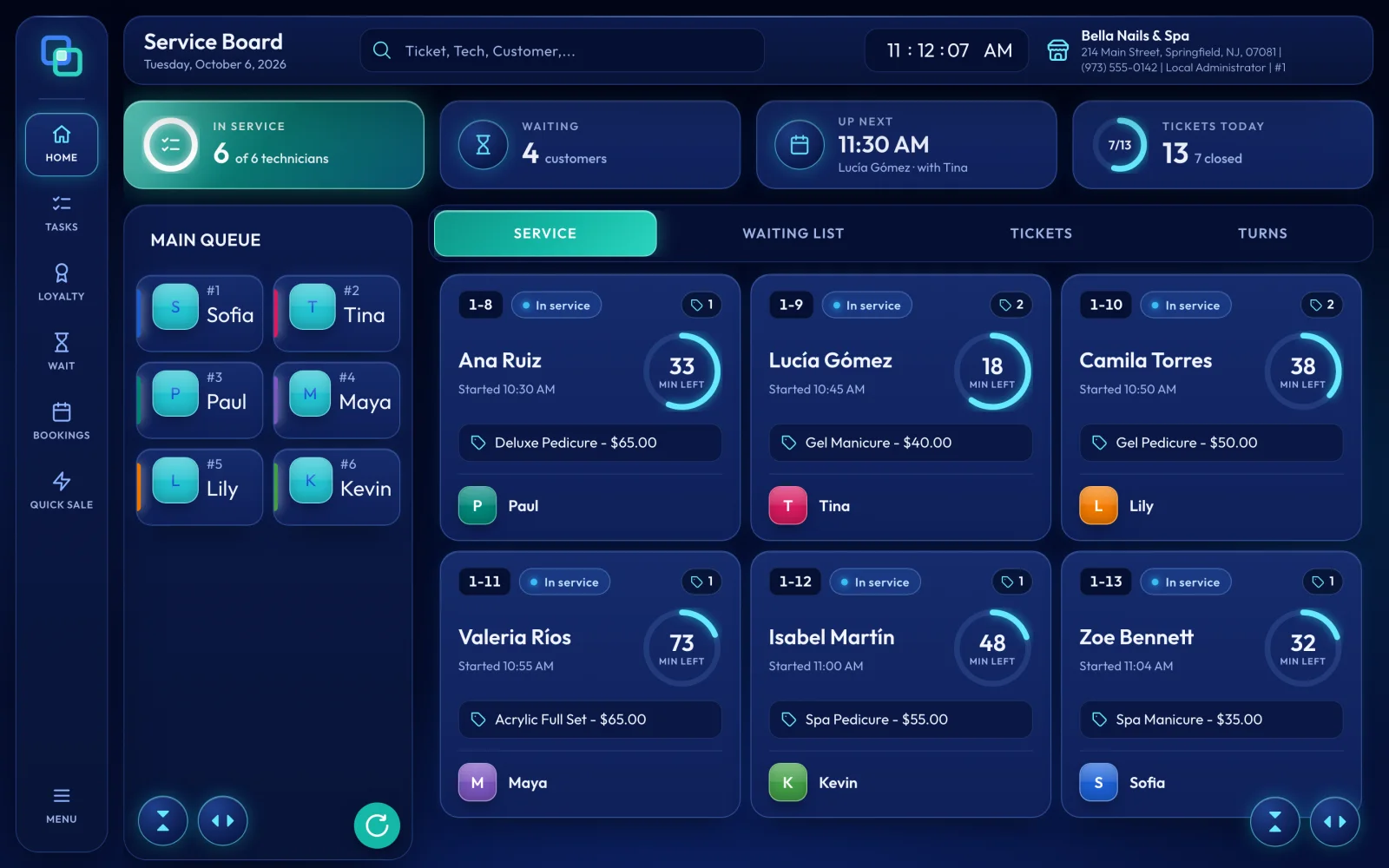
The Service Board is the home screen every register opens on. Four summary cards show today at a glance, the Main Queue of technicians sits on the left, and four tabs on the right hold SERVICE, WAITING LIST, TICKETS and TURNS.
Overview
Use the Service Board to start tickets, follow the services in progress and look back at the day. The top bar shows Service Board with today's date, a search for tickets, technicians and customers, the clock and your store's name.
Summary cards
- In service: how many of the clocked-in technicians are with a client right now, for example 3 of 5 technicians.
- Waiting: how many customers are on the waiting list.
- Up next: today's next appointment, with its time, customer and technician, or No more bookings today.
- Tickets today: all of today's tickets and how many are closed.
The Main Queue
The left column lists the technicians who have clocked in, in turn order, each with their place (#1, #2 and so on) and, when they have one, their Next Appt. A new store has one queue group, MAIN QUEUE; if you add more, each gets its own tab. Tap a technician to start a ticket for them, or press and hold for turn actions such as Add Late Turn, Add Go Again and Move. Depending on your queue settings, a technician busy with a service leaves the list until they finish.
The four tabs
- SERVICE: a card for every open ticket. Tap a card to open the ticket, or press and hold it for a quick preview with View Full Ticket.
- WAITING LIST: clients who checked in on the tablet or were added with WAIT, ready to become tickets.
- TICKETS: the day's closed tickets, with voided ones crossed out in red. Choose another date, or tap the technician picture on a row to Reopen ticket or reprint it.
- TURNS: each technician's turns today, with their Round and Turn counts. Tap a turn to see its receipt.
Drag the tabs into the order you prefer; each register remembers its own. Depending on your settings, TICKETS and TURNS may ask for a password.
Ticket cards and the side rail
Each card shows the ticket number, a status pill (In service, Waiting or Done), the number of services, the customer (or Walk-in) with the start time, a minutes ring, the service in progress and the technician.
On the side rail, HOME brings you back here, TASKS opens daily tasks such as Clock In, Close Out and Refund, LOYALTY opens the Gift Card / Loyalty Balance screen, WAIT adds a client to the waiting list, BOOKINGS opens the appointment book, QUICK SALE starts a sale with your own password and MENU opens Back Office, Reports and more. Apart from HOME and MENU, they work on the Service Board only.
- Minutes ring
- While a service runs, the minutes left (MIN LEFT), or MIN OVER once it passes its time; otherwise the minutes it took (MIN).
- Ticket number
- With more than one register, it starts with the number of the register that created it, for example 2-5.
- Status line
- The service in progress and its price, or, if your registers show it, Waiting for Service, Ready for Payment or Ready to Close.
Last reviewed October 2026. Tell us if something is out of date.

